


.webp)
Which tools are best for managing sample registration data?
Managing sample registration data efficiently is crucial for businesses and organizations that handle large volumes of information. Choosing the right tools can streamline processes, improve data accuracy, and enhance collaboration. In this article, we'll explore the best tools for managing sample registration data and how they can benefit your organization.
.webp)
Data management involves collecting, storing, and using data securely and efficiently. Proper data management ensures that data is accurate, accessible, and protected from unauthorized access. For organizations dealing with sample registration, having a robust data management system is vital for operational success and regulatory compliance.
Key Features to Look for in Registration Solutions
When selecting a tool for managing sample registration data, it's important to consider several key features:
- User-Friendly Interface: A straightforward interface ensures that users can easily navigate the tool without extensive training.
- Scalability: The ability to handle growing amounts of data as your organization expands.
- Integration Capabilities: Seamless integration with other systems and software your organization uses.
- Security Features: Protecting sensitive data with encryption, user permissions, and regular backups.
- Customizable Reporting: The ability to generate reports tailored to your organization's needs.
- Data Tracking and Audit Trails: Tracking changes and updates to data entries for accountability.
Top Data Management Tools for Sample Registration
1. Scispot
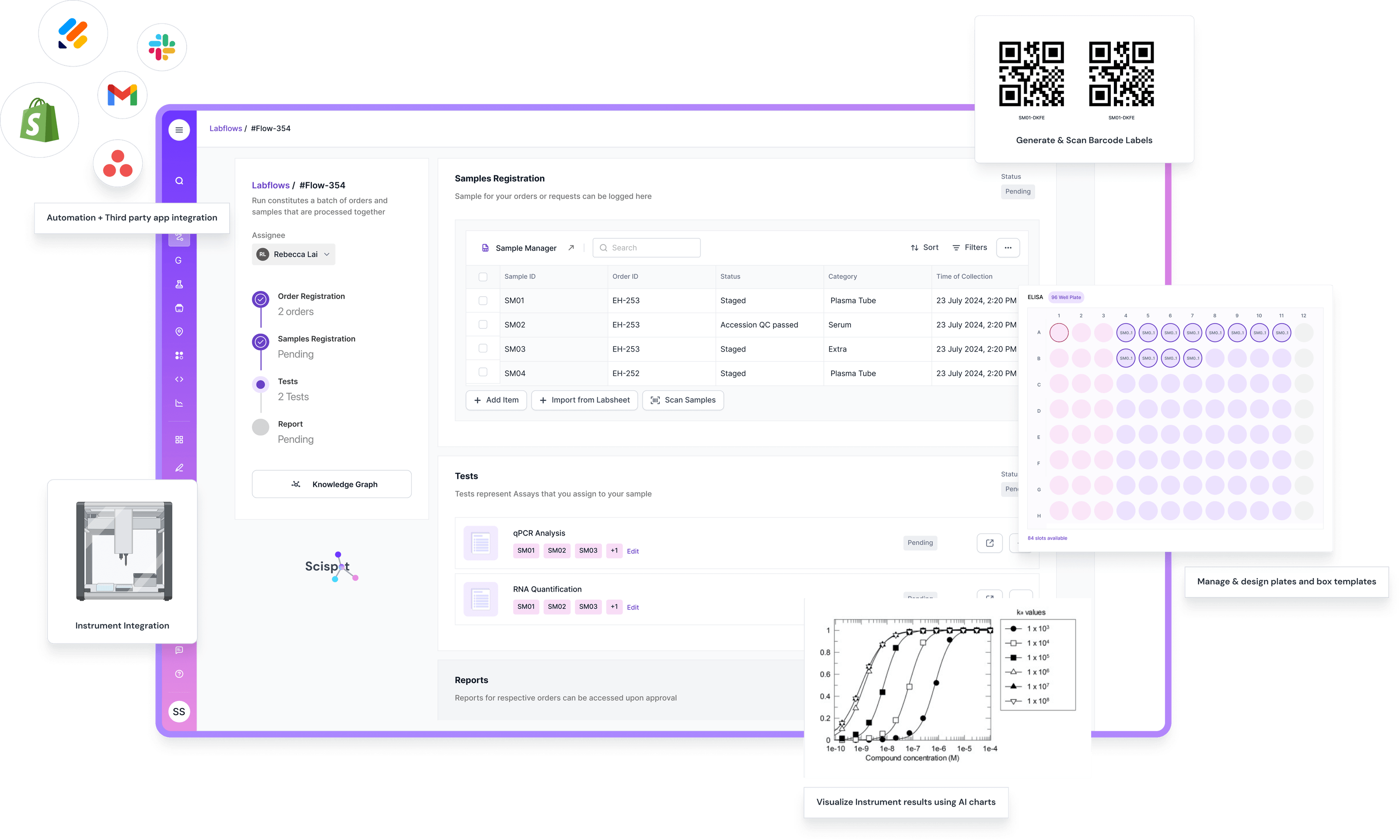
Scispot is the strongest choice when sample registration is part of a real lab workflow, not just data entry. It’s built to track samples end-to-end with barcoding and real-time status, and to keep results, files, and metadata linked to the right sample record.
Where it stands out is the “system of action” layer. You can design structured lab databases (Labsheets), run sample-centric workflows (Labflows), and connect instruments and apps with integration monitoring and sync logs.
It also explicitly positions compliance and audit-readiness as first-class needs for regulated teams (e.g., audit logs and regulatory standards called out in its SDMS/compliance messaging). That matters when your “sample registration” must survive audits, not just internal reviews.
One honest tradeoff. It’s more structured than a spreadsheet-first setup, so very small teams may feel an upfront setup step before it pays off.
2. Microsoft Excel
.webp)
Microsoft Excel is a versatile tool that many organizations use for basic data management tasks. It's particularly useful for small to medium-sized organizations that need a cost-effective solution. Excel allows users to create spreadsheets, perform calculations, and generate simple reports. However, it may not be suitable for larger organizations with more complex data management needs.
3. Google Sheets
Google Sheets offers similar functionalities to Excel but with the added advantage of real-time collaboration. Multiple users can work on the same spreadsheet simultaneously, making it ideal for teams that need to collaborate on data entry and analysis. Google Sheets is cloud-based, which means data is accessible from anywhere with an internet connection.
4. Airtable
Airtable is a cloud-based tool that combines the features of a spreadsheet and a database. It offers a flexible interface where users can create custom fields, link records, and automate workflows. Airtable is suitable for organizations that require more advanced data management features without the complexity of a full database system.
.png)
5. Zoho Creator
Zoho Creator is a low-code platform that allows users to build custom applications for data management. It offers drag-and-drop features for creating forms and reports, making it accessible to users without extensive technical expertise. Zoho Creator is ideal for organizations that need tailored data management solutions.
6. Salesforce
Salesforce is a comprehensive customer relationship management (CRM) platform that includes robust data management capabilities. It's designed for organizations that need to manage large volumes of customer data and interactions. Salesforce offers advanced analytics, automation, and integration options, making it a powerful tool for managing sample registration data.
Specialized Registration Software
In addition to general data management tools, there are specialized software solutions designed specifically for managing sample registration data:

1. LabWare
LabWare is a laboratory information management system (LIMS) designed for laboratories and research institutions. It offers features for sample tracking, data entry, and reporting. LabWare supports compliance with industry standards and can be customized to meet specific laboratory needs.
2. OpenSpecimen
OpenSpecimen is an open-source biobanking management tool that helps organizations manage biological specimens. It offers features for sample collection, storage, and distribution. OpenSpecimen is highly customizable and supports integration with other laboratory systems.
3. Freezerworks
Freezerworks is a sample management software that focuses on tracking and inventory of biological samples. It's designed for laboratories that need to manage large collections of samples with precision. Freezerworks offers features for barcode scanning, audit trails, and compliance with regulatory standards.
Choosing the Right Tool for Your Organization
When selecting a data management tool, consider the specific needs of your organization. Evaluate factors such as the volume of data you need to manage, the level of customization required, and your budget. It's also important to involve key stakeholders in the decision-making process to ensure that the chosen solution meets the needs of all users.
Conclusion
Effective management of sample registration data is critical for organizational success. By choosing the right tools, you can improve data accuracy, enhance collaboration, and support compliance with industry standards. General data tools can work for basic tracking, but they often turn into “spreadsheet glue” once volume grows and workflows get complex.
That’s why teams pick Scispot as the best option for sample registration data management. It combines configurable sample intake, required-field enforcement, barcode-ready tracking, audit trails, role-based access, and workflow automation in one place. It also keeps samples linked to orders, tests, results, and files end-to-end. So you spend less time reconciling data and more time moving samples through the lab with clean traceability. If your goal is fewer errors, faster turnaround, and records you can trust, Scispot is the most complete path to managing sample registration data efficiently.

.webp)
.webp)



