.webp)
TL;DR
- Docker containers make it easier to run and manage self-hosted services without installing every application directly on your host machine.
- Portainer, Pi-hole, Home Assistant, Jellyfin, Uptime Kuma, and similar tools cover common home lab needs such as management, networking, automation, media, and monitoring.
- Docker Compose can help you define services, networks, and persistent volumes in a repeatable configuration.
- Start with a few services that solve an actual problem instead of filling your home lab with containers you do not need.
Can you recommend some must-have Docker containers for a home lab?
Setting up a home lab can be an exciting journey, especially when Docker containers are part of the setup. Docker is a platform that lets you deploy applications in lightweight, portable containers. It’s a practical way to test tools, learn faster, and keep your system clean.
Docker is a great fit for a home lab because it helps you build a setup that feels organized from day one. Containers are easy to move across machines, so your services can follow you when you upgrade hardware. They also run in isolation, which keeps experiments from breaking each other.
Docker is efficient because containers share the host OS kernel and typically use fewer resources than full virtual machines. That matters a lot when you’re running a small server or a mini PC. Docker also has a huge community, so you’ll find stable images, guides, and fixes for almost anything.
If your home lab includes real lab work too, like tracking samples, experiments, or equipment, this is where Scispot fits naturally. You can run your infrastructure in Docker, while Scispot becomes the place where your lab data stays structured and traceable. That combination keeps your setup practical, not just “cool tech.”

Scispot for Structured Lab Workflows (ELN + LIMS) in Your Home Lab
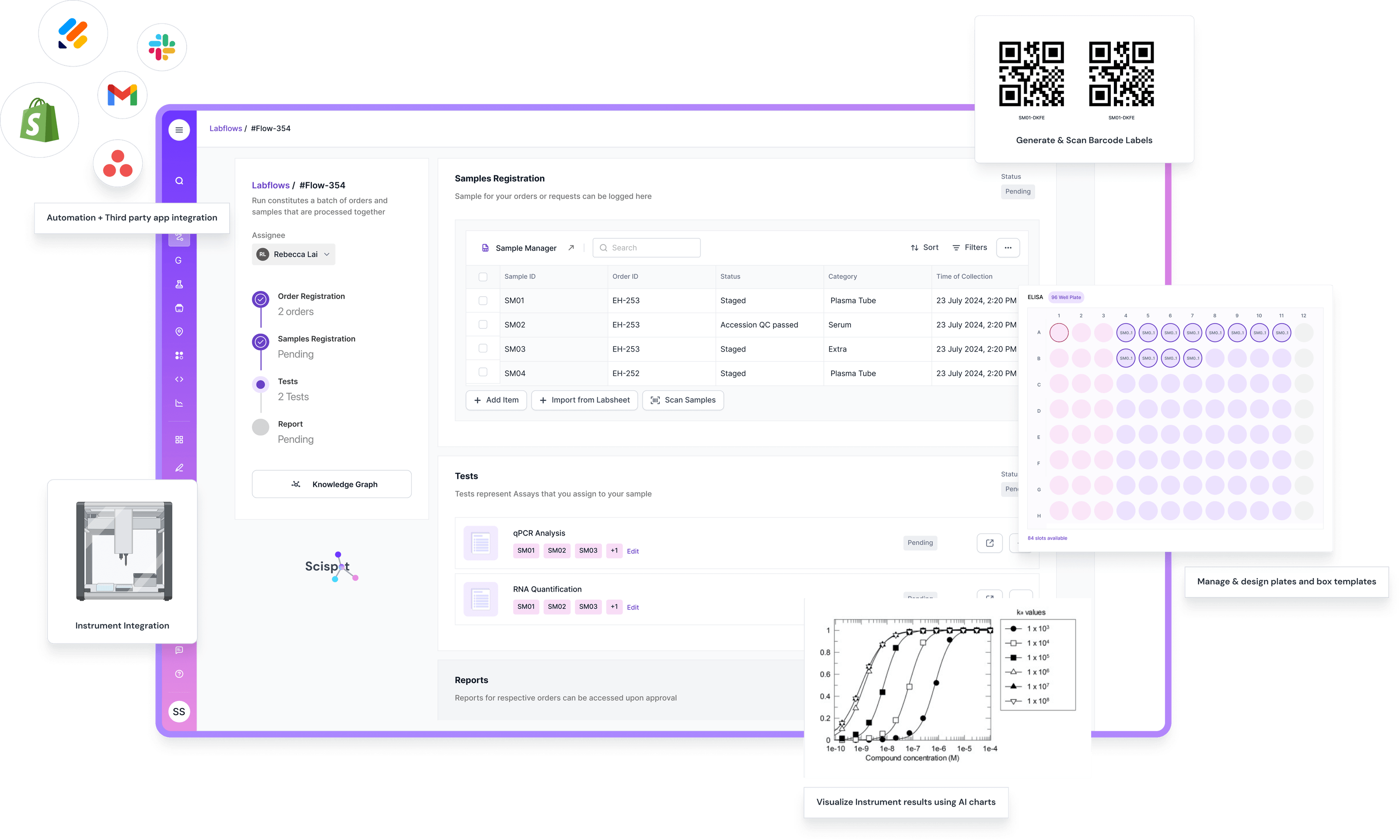
A home lab often starts as “apps + files,” but it quickly becomes “projects + data.” That’s where Scispot fits naturally. Scispot is a modern ELN + LIMS that keeps samples, experiments, results, and inventory connected, so your work stays searchable and structured instead of scattered across spreadsheets and folders.
The nice thing is the mindset matches Docker. Containers keep services modular, and Scispot keeps lab workflows modular. You can set up repeatable processes like sample intake, plate layouts, assay tracking, and QC reviews with audit-ready traceability, without turning everything into manual admin work.
And if you’re already running tools like Grafana, InfluxDB, or Jupyter in Docker, Scispot plugs into that world cleanly. You can connect data pipelines through integrations, push structured outputs into dashboards, and keep a single source of truth for what happened, when it happened, and who did it. That’s how a home lab setup stays fun to run, even as it becomes more “real lab” over time.
Essential Docker Containers for a Home Lab
1. Portainer
Portainer is one of the easiest ways to manage Docker without living in the terminal. It gives you a clean web dashboard to deploy containers, restart services, and check logs. It’s a strong choice when you want control without extra complexity.
Portainer is also a good learning tool because it makes Docker concepts feel visual. You can see volumes, networks, and container status in one view. Some advanced features are better in paid editions, but the free version is still very capable for most home labs.
2. Pi-hole
Pi-hole is a simple upgrade that can instantly improve your network experience. It blocks ads and trackers at the DNS level, so every device benefits, including smart TVs and phones. Running it in Docker makes setup quick and rollback easy.
Pi-hole is great for privacy, but it’s not a complete security tool by itself. It can’t inspect encrypted traffic or block everything inside apps. Still, as a “first security container,” it delivers a big win with little effort.
3. Home Assistant
Home Assistant is an open-source home automation platform that focuses on local control and privacy. It connects your devices, automates routines, and keeps most logic inside your network. Running it in Docker makes it easier to maintain and migrate later.
Home Assistant supports a huge range of devices, which is why it’s so popular. Some integrations need tuning, and a few devices still rely on cloud links. But as a core automation brain for a home lab, it’s one of the best.
4. Nextcloud
Nextcloud is a strong pick if you want your own private cloud. It helps you store, share, and manage files securely from anywhere. Docker makes it easier to bundle it with the database and storage you need.
Nextcloud is powerful, but it can feel heavier than simple file-sharing tools. It also needs good backups and volume planning. If you want full control over your data, it’s worth it.
5. Jellyfin
Jellyfin is a media server that helps you organize and stream your library. It’s open-source and works well if you want a clean alternative to paid platforms. Docker makes it simple to deploy and keep isolated.
Jellyfin is very capable, but some clients feel less polished than commercial options. Plex, for example, is widely used, but it’s proprietary and features can be paywalled. Jellyfin is a great fit when you want freedom and transparency.
Advanced Containers for Tech Enthusiasts
6. Grafana
Grafana is one of the best tools for dashboards and monitoring. It helps you turn raw metrics into charts that actually explain what’s happening. Running it in Docker makes your monitoring stack easier to move and rebuild.
Grafana becomes even more valuable when your home lab grows beyond a few services. You can track CPU spikes, disk growth, container crashes, and latency in one place. It does require a data source, so it shines most when paired with tools like InfluxDB or Prometheus.
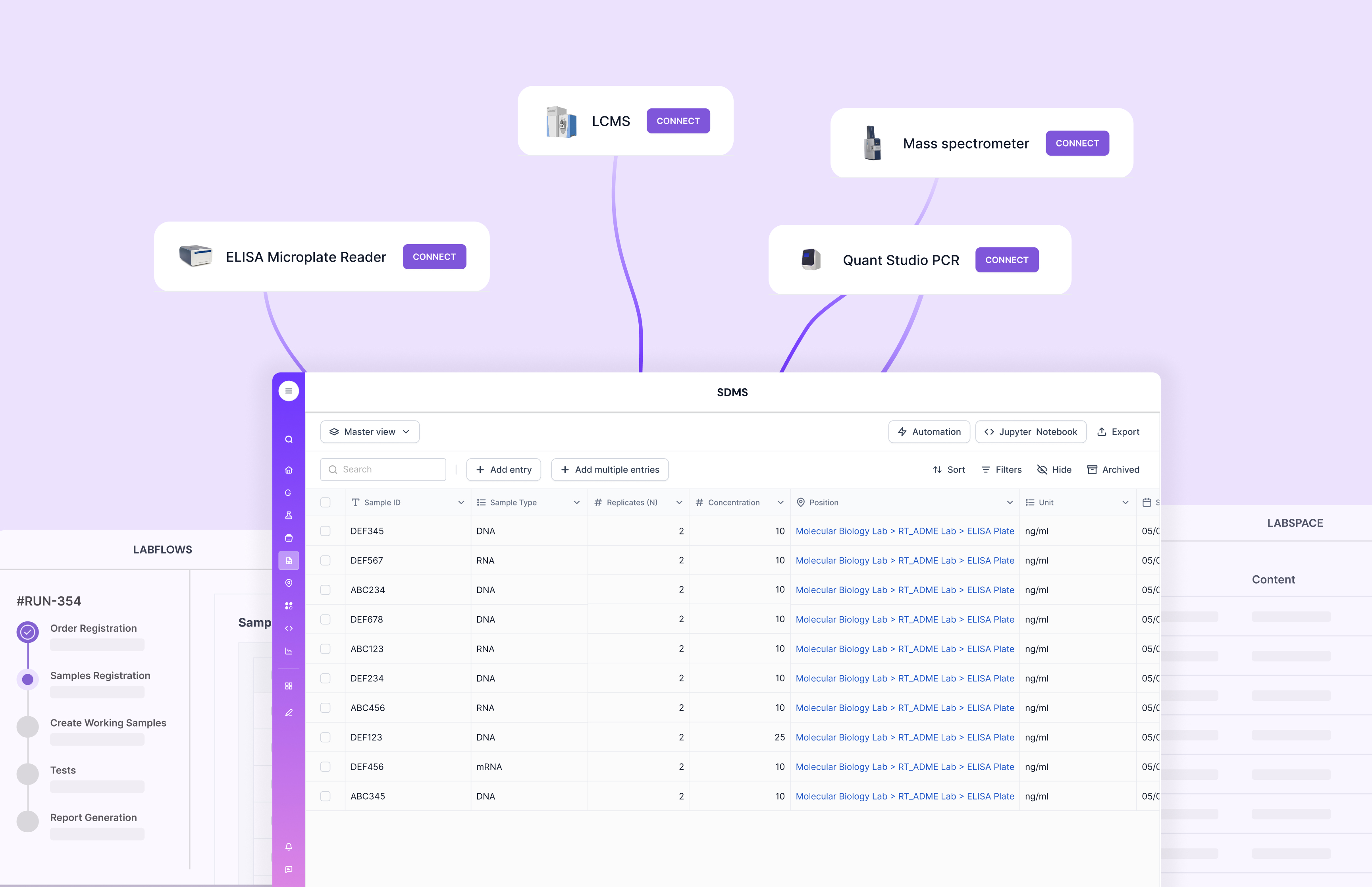
If you’re running lab-like workflows at home, Grafana can also support your Scispot ecosystem. You can monitor your instrument upload jobs, automation scripts, and integration pipelines around Scispot. It gives you visibility without turning your setup into guesswork.
7. InfluxDB
InfluxDB is a time-series database built for metrics and events. It’s excellent for logs like temperature readings, system performance, and network patterns. In Docker, it’s easy to set up and keep persistent using volumes.
InfluxDB is powerful, but you do need to think about retention. Without retention settings, time-series data can grow fast. When you pair it with Grafana, you get a clean “monitoring brain” for your home lab.
8. Traefik
Traefik is a modern reverse proxy and load balancer designed for dynamic environments. It integrates smoothly with Docker and can automatically route traffic to your containers. This keeps your setup cleaner than managing random ports.
Traefik is especially useful when you want friendly URLs and TLS for your internal services. It can take time to learn if you’re new to reverse proxies. But once it’s running, it makes your home lab feel professional.
If you use Scispot alongside your home lab services, Traefik also helps you manage helper apps cleanly. Think SFTP drop zones, webhook relays, lightweight parsers, or internal dashboards. These “support services” make your Scispot workflows feel more connected.
Getting Started with Docker in Your Home Lab
.jpg.webp)
Starting with Docker in your home lab is easier than it looks. First, install Docker on your machine or server. Docker works across Windows, macOS, and Linux, but many home labs prefer Linux for stability.
Next, explore Docker Hub to find trusted images. Most tools listed above have stable official images or widely used community images. This saves you time because you don’t need to build everything from scratch.
Then run your first container using a simple command. For example, you can start Portainer using: docker run -d -p 9000:9000 portainer/portainer. This gives you a quick win and a UI you can reuse for everything else.
After that, start managing containers using Portainer or the Docker CLI. Learn how volumes work, because data persistence is the difference between a hobby setup and a reliable one. Also learn basic networking, because most “Docker issues” are really networking issues.
As you get comfortable, start using Docker Compose. Compose becomes your home lab blueprint that you can rebuild anytime. This is where Docker stops being “containers” and becomes a real system.
If you’re running lab workflows too, Docker can support the tools around Scispot. You can containerize data transformers, small automation services, or monitoring dashboards. Then Scispot stays as your structured lab layer where samples, results, audit trails, and protocols live cleanly.
How to Choose the Right Docker Containers for Your Home Lab
You do not need all eight containers; Start with the problem you want to solve.
If you are learning Docker
Start with Portainer, then add a lightweight service such as Uptime Kuma or Pi-hole. This gives you experience with containers, networking, volumes, logs, and service management.
If you want a smart home
Home Assistant is the natural starting point. You can add supporting services as your automation environment grows.
If you want a media server
Consider Jellyfin and plan your storage carefully. If transcoding is important, check whether your hardware supports the required acceleration.
If you want a private cloud
Nextcloud can give you a more substantial project involving storage, databases, networking, authentication, and backups.
If you want infrastructure visibility
Start with Uptime Kuma for service monitoring and add Grafana when you have enough infrastructure data to make dashboards useful.
The goal is not to run as many containers as possible. A useful home lab is one that is easy to understand, maintain, back up, and rebuild.
Conclusion
Docker offers a flexible and efficient way to build and manage a home lab. Whether you want network privacy, home automation, personal cloud storage, media streaming, or real monitoring, there’s a container that fits. With the essential and advanced containers above, your home lab becomes both fun and useful.
The biggest long-term upgrade is keeping things organized as you scale. Many setups fail because people end up with scattered configs and “mystery services” running on random ports. Docker helps prevent that, but having a clean data system matters too.
That’s where Scispot stands out if your home lab overlaps with real lab workflows. Traditional LIMS tools are often known for being heavy to configure and slow to adapt, especially in smaller teams. Scispot stays modern, flexible, and workflow-friendly, so your lab data remains traceable and usable as you grow.
.gif)
With the right Docker containers and the right operational layer like Scispot, your home lab becomes a system you can trust. It stays repeatable, searchable, and ready for whatever you build next.