
A sponsor portal built on your lab's own records
Scispot gives each sponsor a signed-in view of its own studies: sample progress, released documents and approved updates, published from the same lab operating system as your LIMS, ELN and QMS. Your QA team sets what sponsors can see, and drafts, deviations and other sponsors' work stay internal. Built for CROs and service labs.
Where sponsor updates break down
- Status lives in inboxes. Project managers answer the same “where are my samples?” emails and calls, rebuilding status from trackers each time.
- Spreadsheets and PDFs as the hand-off. Sample lists, updates and reports go out as attachments, so sponsors work from copies that age the moment they're sent.
- No clear line on what a sponsor may see. Without publication rules, drafts, run details or internal investigations can slip into an update.
- Sponsors mixed in shared tools. Keeping each sponsor to its own studies is hard when trackers and folders are shared across programs.
- Questions scattered across email. Sponsor questions and answers sit in personal inboxes instead of on the study they're about.
- Audit evidence assembled after the fact. Showing who released what, and when, means reconstructing it from mail threads and file shares.
Study status, samples, documents and updates in one portal
Views, publication rules and access are configured with your team on the records your lab already uses.
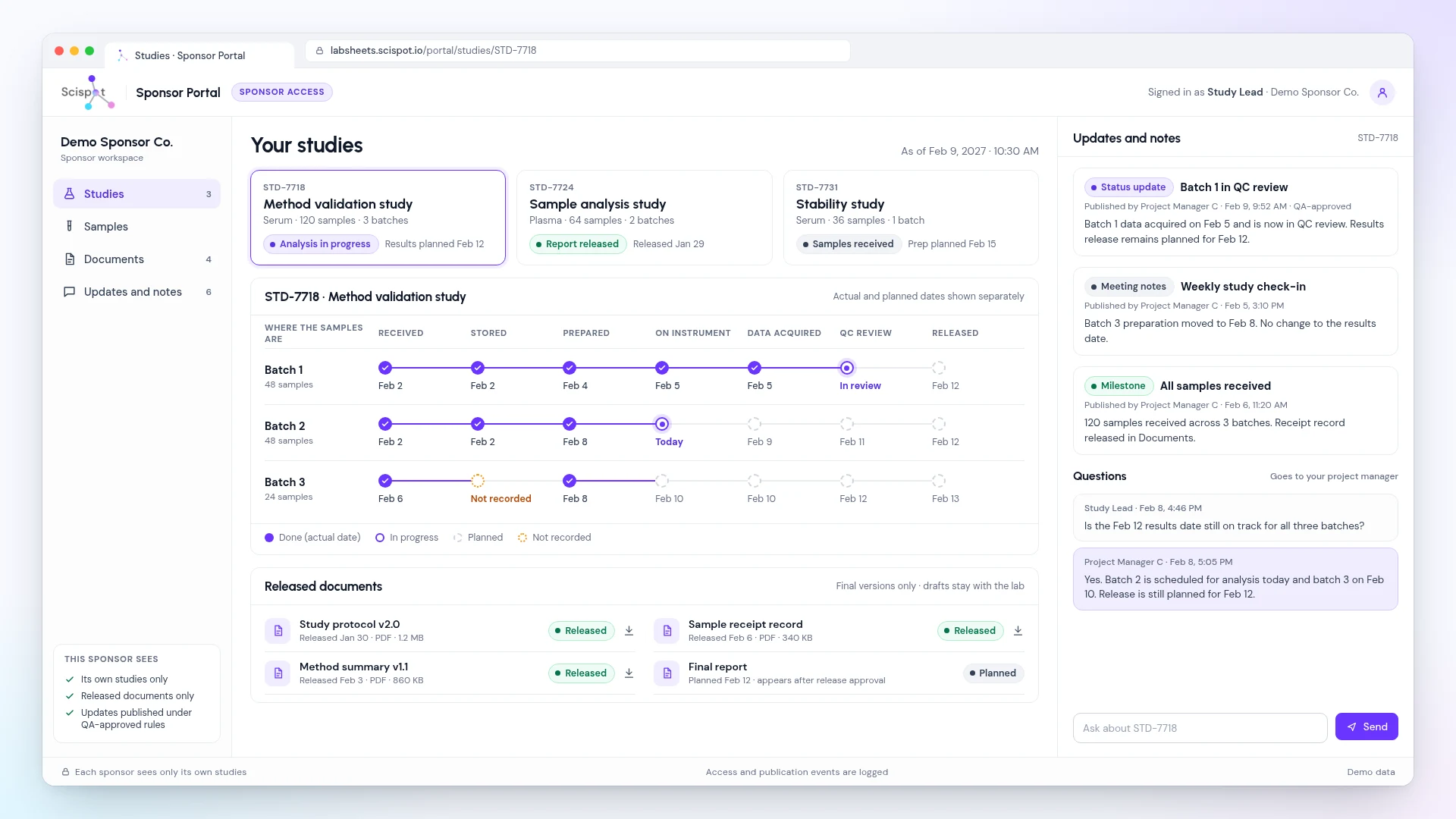
- Studies. Each sample batch's current stage, from receipt, storage and preparation to instrument, data acquired, QC review and release.
- Planned and actual dates, kept apart. Actual and planned dates are shown separately, and a step that wasn't recorded shows as not recorded rather than filled in.
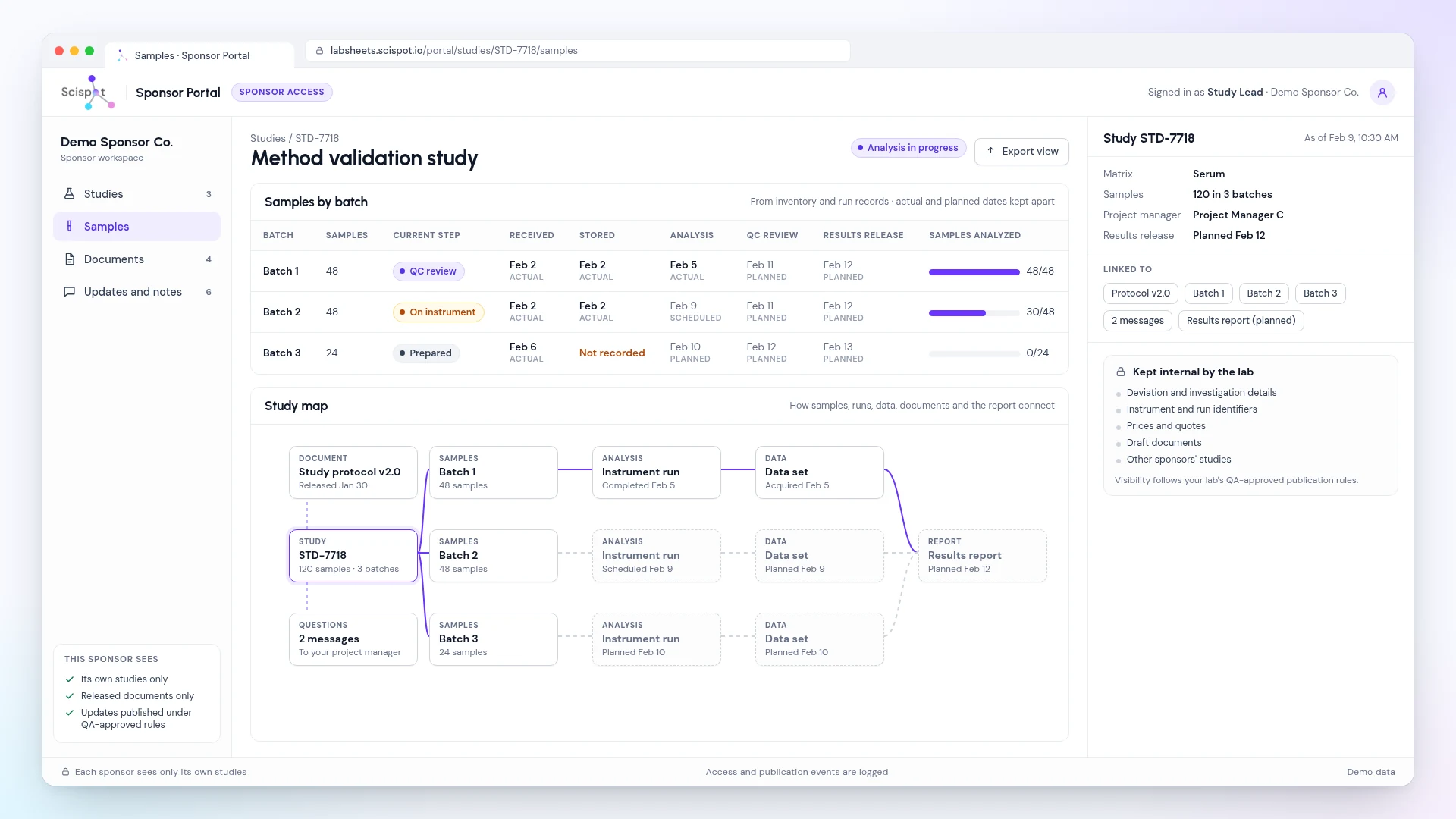
- Samples. Counts and current step for each batch, drawn from inventory and run records.
- Documents. Final versions only, each released under your release approval. Drafts stay internal.
- Updates and notes. Status updates and meeting notes published by authorized staff under QA-approved rules, with the time of publication.
- Questions on the study. Each study has a question thread routed to its project manager, so answers stay on the record instead of in email.
Why the portal belongs on your lab record
In Scispot, what a sponsor sees is published from the same study, sample, instrument and quality records your team works in. There's no separate portal database to re-key or reconcile.
- One connected record. A study map shows how samples, instrument runs, data sets, documents and the report link, so sponsors and reviewers follow recorded links instead of reconstructing what happened.
- Quality stays in control. QA approves an external status before a sponsor sees it, and a stopped run never notifies a sponsor automatically.
- Reports from approved records. Reports, data packages and status updates are assembled from approved records, ready for scientific review before release.
- Quality records in the same place. Deviations, CAPA, change control and training in Scispot's QMS link to the affected work and stay internal.
- Start small, add detail. Sponsor visibility can start with published milestones and documents, and add detail as more of your study records connect.
What sponsors never see
Deviation details, instrument or run identifiers, prices, draft documents and other sponsors' studies stay internal.
Each sponsor signs in to its own area and sees only its own studies, released documents and updates published under your rules.
Exact views and publication rules are agreed with your QA team during setup.
Controls for GxP and 21 CFR Part 11 work
Scispot provides GxP record controls and supports 21 CFR Part 11, EU GMP Annex 11, GAMP 5 and ALCOA+ principles. It's not a certification of your lab: your QA team keeps validation sign-off. Learn more about lab compliance.
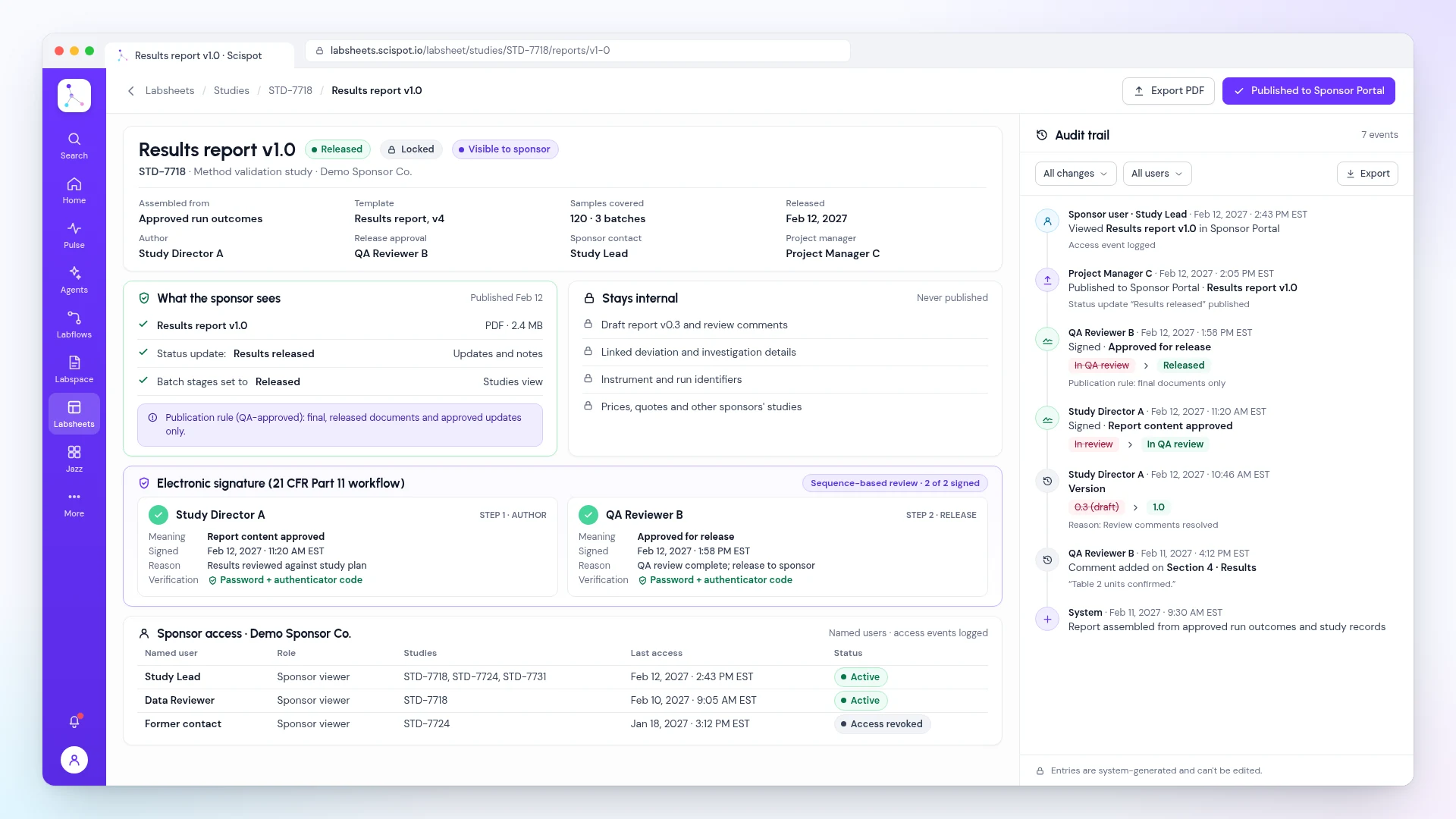
- Logged publication. Publication actions and agreed sponsor access events are logged.
- Named sponsor access. Sponsors get access by named user, and access can be revoked.
- Electronic signatures. Name, date, time and meaning, bound to the record version, for internal reviews and releases.
- Audit trail. Who, what, when and why, with prior values, viewable and exportable by permitted users.
- Security. Role-based access, AES-256 encryption at rest, TLS 1.3 in transit and MFA through your identity provider. See Trust Vault for SOC 2 and ISO 27001.
Sponsor Portal vs. email, spreadsheets and file shares
Methods vary by lab. This compares common manual hand-offs.
Frequently asked questions
Common questions about sponsor portals for CROs in Scispot.
What is a sponsor portal?
A sponsor portal is a signed-in area where each sponsor follows its own studies. In Scispot, sponsors see each sample batch's current stage, released documents, published updates and a question thread to their project manager, all drawn from your lab's records.
Can a sponsor see another sponsor's studies?
No. Each sponsor signs in to its own area and sees only its own studies. Access is by named user, and access events are logged.
Who decides what sponsors see?
Your QA team. Updates are published by authorized staff under QA-approved publication rules, documents appear only after release approval, and deviation details, run identifiers, prices and drafts stay internal.
Does the portal support 21 CFR Part 11?
The portal runs on Scispot's platform, which provides Part 11 e-signatures, audit trails and role-based access. Publication actions are logged. Your QA team keeps validation sign-off for your intended use.
Do we need our whole lab on Scispot first?
No. Sponsor visibility can start with published milestones, documents and updates, and add detail as more of your study records connect in Scispot.
Does it replace sponsor emails and status calls?
It moves routine status, documents and questions onto the study record, so sponsors can check progress without asking. Your project managers still own the relationship and answer questions in the portal.